









The best QuickBooks Desktop & Enterprise API on the planet

Real-time access to every QuickBooks Desktop object via MCP, Python, Node.js/TypeScript, and REST.

Conductor TypeScript API package for QuickBooks Desktop

SYNCING 1,800+ BUSINESSES

SYNCING 1,800+ BUSINESSES

  • Pallet

    WizCommerce logo

    WizCommerce

    TrashLab logo
    Attain logo

    Attain

    Spotdly logo
  • Mortarlink logo
    iTV Valuations logo

    Model Wiz

    TrashLab logo

    CLOUDRIG

  • </ ANCKR>

    Suppliermate Logo
    Krahnborn logo
    Spotdly logo
    Spotdly logo

    SilkRoute AI

    Stak

  • Spotdly logo
    Spotdly logo

    Vambrace AI

    Groundscale AI

    Filter Groove

    iTV Valuations logo

    DEV///AO

    scout.

    iTV Valuations logo

QuickBooks Desktop MCP
in your AI tools

QuickBooks Desktop MCP in your AI tools

QuickBooks Desktop MCP
in your AI tools

Conductorโ€™s MCP server at mcp.conductor.is connects QuickBooks Desktop to the AI tools you already use:

  • Your AI tools get full access to your QuickBooks Desktop data: they can look up, create, and update any record, and delete any transaction.

  • Works with any MCP-compatible client, including Claude, ChatGPT, and Cursor (setup guide).

  • Every request goes through your authenticated Conductor connection.

Your AI tool

Connected via Conductor

Which invoices are 30+ days overdue?

Thought for 4s

Iโ€™ll use Conductor to pull open invoices from QuickBooks Desktop, keep the ones 30+ days overdue, and add customer names.

Getting open invoices with Conductor

Getting open invoices with Conductor

invoices.list

Looking up customer names with Conductor

Looking up customer names with Conductor

customers.list

Conductor found 2 invoices 30+ days overdue, totaling $7,970:

Hartwell Construction

52d overdue

$4,820.00

Bluepine Landscaping

41d overdue

$3,150.00

Add โ€œFollow up Oct 20โ€ to both memos

Thought for 2s

Conductor can write the memo field on each invoice directly.

Updating invoice memos with Conductor

invoices.update

Done. Conductor updated both memos in QuickBooks Desktop.

Ask a follow-upโ€ฆ

Every piece of
QuickBooks data

Every piece of
QuickBooks data

Conductor reaches every type of data in QuickBooks Desktop and Enterprise: customers, vendors, invoices, bills, payments, items, inventory, reports, and more.

You can look up, create, and update any of it, and delete any transaction, the same work you would otherwise do by hand in QuickBooks.

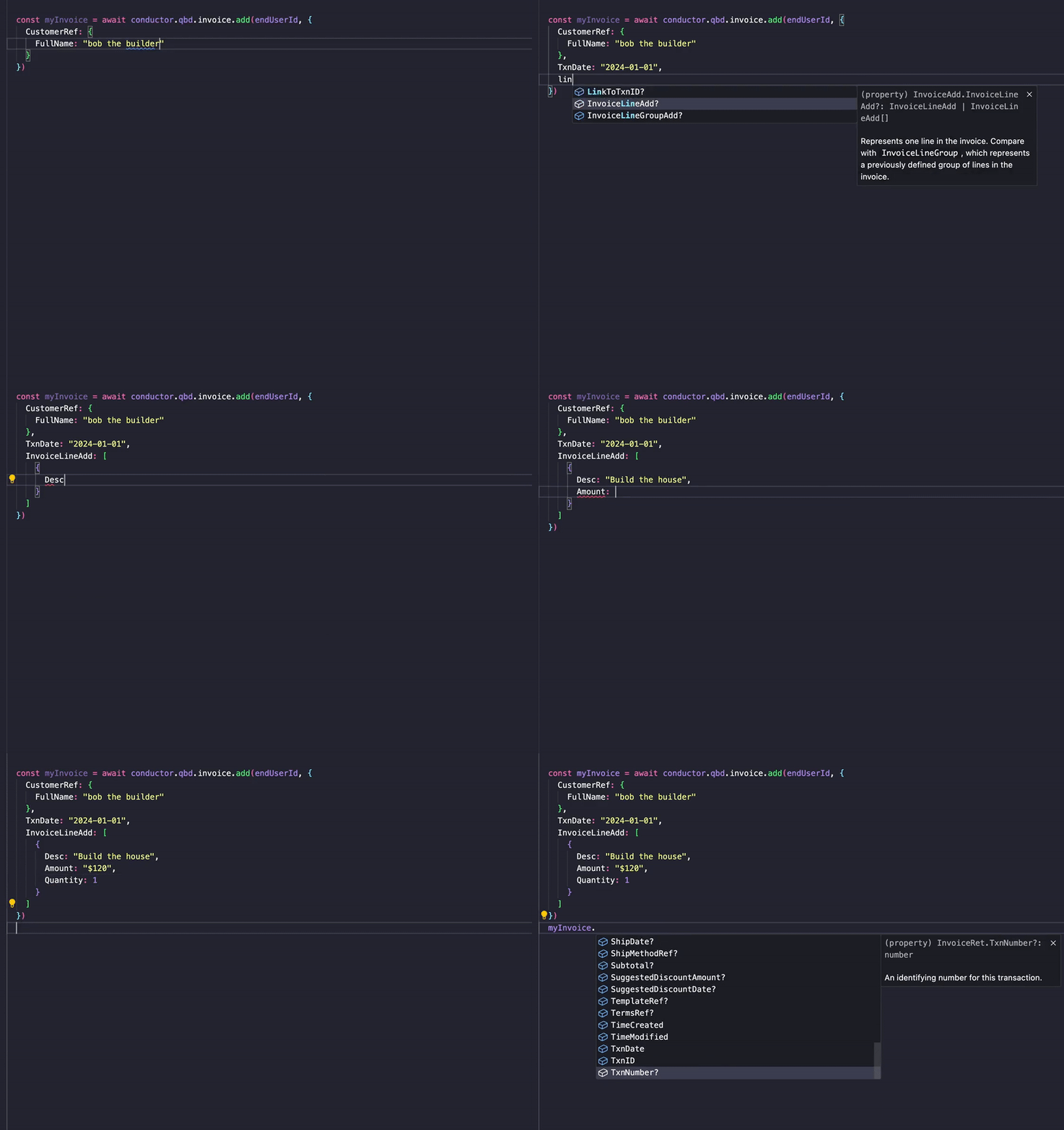
If you write code, Conductorโ€™s Python and Node.js libraries are fully typed, with autocomplete for every field.

npm install conductor-node

pip install conductor-py

1

2

3

4

5

6

7

8

9

10

11

12

13

14

import Conductor from "conductor-node";
const conductor = new Conductor({ apiKey: "sk_test_..." });

// Create, fetch, or update any QuickBooks Desktop object.

const invoice = await conductor.qbd.invoices.create({

conductorEndUserId: "end_usr_...",

customerId: "abc_123...",
dueDate: "2027-06-30",
lines: [{
itemId: "xyz_456...",
quantity: 5,
rate: "100.00",
}],
});

Unreasonably
sexy dashboard

Unreasonably
sexy dashboard

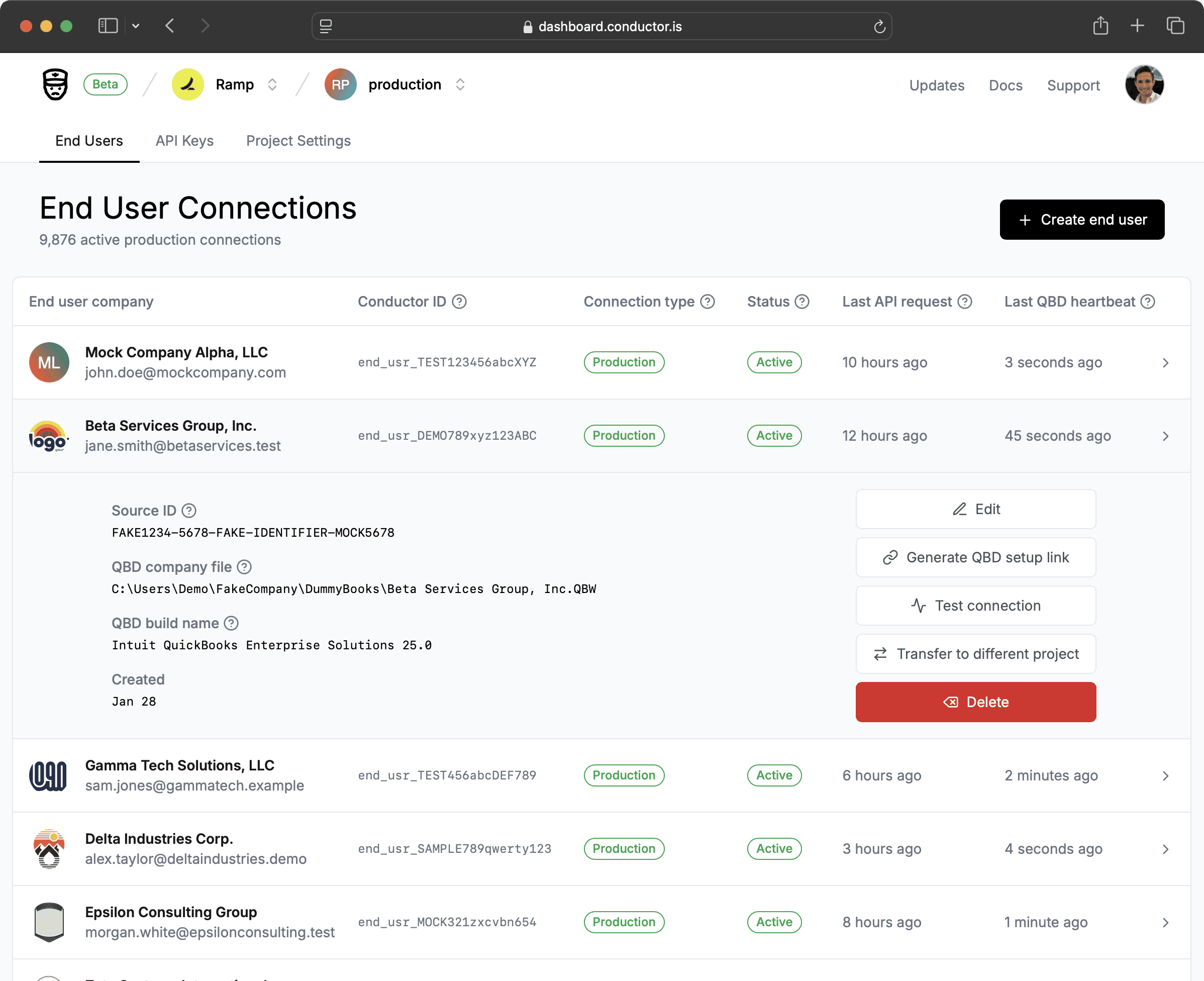
Conductorโ€™s lightning-fast dashboard shows every QuickBooks Desktop connection at a glance: its status, the company file itโ€™s linked to, and when QuickBooks last checked in. Test a connection with one click, reset a moved company file, create API keys, and connect your AI tools, all from one place.

Conductor QuickBooks Desktop auth flow

Simple to set up,
hard to break

Simple to set up,
hard to break

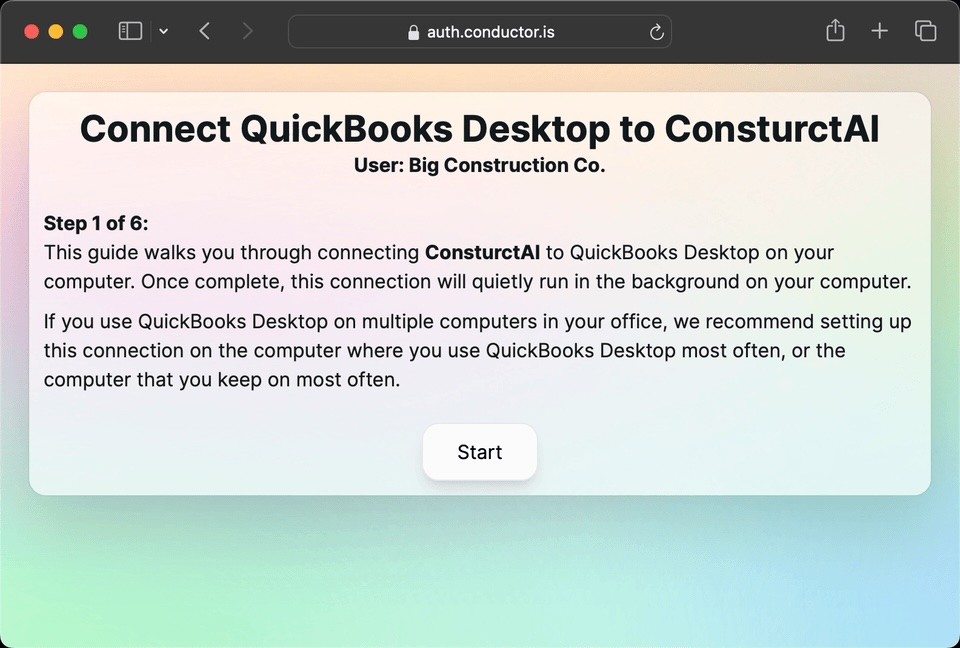
Connecting QuickBooks Desktop has always meant installing the Web Connector, configuring it by hand, and decoding errors that say nothing. Conductor walks you through every step:

  • Guided screens take you from download to a working connection.

  • Every error explains what went wrong and how to fix it.

  • Years of QuickBooks Desktop edge cases, like moved company files, hidden pop-up dialogs, and Windows permission mismatches, are already accounted for.

Conductor QuickBooks Desktop auth flow

QuickBooks
errors, explained

QuickBooks
errors, explained

QuickBooks Desktop reports errors from several layers, each in its own format, and some do not say what went wrong.

Conductor returns every error in one consistent format and turns the cryptic ones into a plain explanation of the cause and the fix, with a link to a step-by-step guide where one exists.

Real QuickBooks Desktop errors
Error from QuickBooks DesktopNo next step

Retrieving the COM class factory for component with CLSID {45F5708E-3B43-4FA8-BE7E-A5F1849214CB} failed due to the following error: 80040154 Class not registered (Exception from HRESULT: 0x80040154 (REGDB_E_CLASSNOTREG)).

Improved error from Conductor

QuickBooks Desktop connection failed (0x80040154): We could not connect to your QuickBooks Desktop because some QuickBooks integration components on your computer are not set up correctly. This usually happens after a QuickBooks installation or update issue. To fix this, follow this guide to re-register the QuickBooks components: https://docs.conductor.is/help/connection-errors/unable-to-cast-com-object

Ruthlessly obsessed with every quirk of QuickBooks Desktop

We agonize over the edge-cases to create the most robust integrations with the simplest APIs.

We agonize over the edge-cases to create the most robust integrations with the simplest APIs.

CONDUCTOR

CONDUCTOR

Instant integration

Instant integration

End-to-end type safety

End-to-end type safety

100% API coverage of every endpoint

100% API coverage of every endpoint

Real-time bidirectional read/write sync

Real-time bidirectional read/write sync

Automated error handling and monitoring

Automated error handling and monitoring

Pricing

Trial

Free

1 connection for testing and development only

Unlimited API usage for testing

Unlimited API usage for testing

Self-serve connection setup

Library of crafted help guides for common QuickBooks Desktop issues

24/7 customer support

Trial

Free

1 connection for testing and development only

Unlimited API usage for testing

Self-serve connection setup

Library of crafted help guides for common QuickBooks Desktop issues

24/7 customer support

Production

$49

per company file
per month

Free for unlimited testing until you ship to production

Unlimited production API usage

Dedicated Slack channel with our engineering team

Fully typed native real-time SDKs for Python and Node/JS/TS

Guided setup for connecting QuickBooks Desktop

Dashboard to manage, monitor, and debug connections

Enterprise

Tailored pricing

Everything in the Production plan, plusโ€ฆ

Volume discounts for customers with many connections

Wall of love

  • โ€œIt's been seamless.โ€

    โ€œI wish Iโ€™d known about this for years.โ€

    โ€œYouโ€™ve got a great product here [...], and Iโ€™m excited to keep building on it!โ€

    โ€œThe level of support and concern youโ€™ve shown for my success from the start is next to none! [...] youโ€™re certainly selling yourself short at the proposed $49/mo.โ€

    "You are an absolutely GOATed resource."

    "Quite phenomenal."

    โ€œThe initialization process with the auth-session URL saves a ton of time, and I really appreciate the simplicity of it. Great stuff there!โ€

    โ€œI love the autocomplete on the API - it has made it very easy to use!โ€

    "Fantastic piece of software! And an amazing company - impressive how you pick up on everything."

    "Super fast support!"

    "You and your team are amazing. It's rare to see this type of execution."

    "100% a Stripe-quality dev experience."

    "My jaw dropped when I saw what you have done with Conductor. It looks awesome."

    "We LOVE the Conductor API!"

    "Your support is extremely helpful. Honestly, one of the best support services weโ€™ve ever received."

    "You are something else mannnnn. Really amazing work. Can't say enough."

    "Quite happy we found your product. Made the integration a breeze.โ€

    "Kudos on building a killer product!! Thank you for doing all the things that Intuit would never natively do!"

    "Amazing customer service man, as always"

    "As usual, love your work."

    "It is a great product."

    "Your MCP is amazing, and we're thrilled to have this tool."

    "We had a flaky XML interface weโ€™d baked ourselves, and it worked, but maintaining it was terrifying. I had one state-of-the-art agent migrate to Conductor in one afternoon, and I actually am confident in the connection now - plus I can send invoices without a queue! Amazing! Itโ€™s made working with QuickBooks Desktop actually scalable."

  • โ€œThis is amazing! I have been scouring the internet looking for this exact solution!โ€

    โ€œThe best [customer] support I've ever had in my life!"

    โ€œNice, looks like Conductorโ€™s API simplifies things quite a bit here. Almost feels like interacting with a Stripe API.โ€

    โ€œNice work on this. [...] I love what you are building.โ€

    โ€œIโ€™m really impressed with how easy it's been to use Conductor."

    โ€œI think Conductor is a really good tool. [โ€ฆ] It was much easier, cleaner, and more flexible than using some of the existing packages like DBSync and Commercient.โ€

    "Love what you're doing here! I can't imagine us having to integrate with some of these dinosaur accounting systems directly!"

    โ€œThe autocomplete and types for each object is sooooo nice.โ€

    "Really loving Conductor - perfect for the product I'm building."

    "Your documentation is really good!"

    "This SDK is very impressive. Crazy amount of documentation on schemas." - Ramp

    "The detailed docs and v2 API are legit. This is great!"

    "Conductor is excellent - thank you for taming the chaos of QuickBooks desktop and bundling it into a service with a fantastic developer experience."

    "Can't stress enough how much I'm loving using Conductor for this!"

    "Our integrations teams loves your Conductor component, we use it a ton."

    โ€œIt all seems to work very well. We are very impressed with the work you guys have done.โ€

    "You guys are really amazing. We are using Conductor in all of our web applications."

    "I've loved using Conductor so far, and it's something that is making our AI implementation smoother and also making using Quickbooks more effective for us."

    "Danny, you are a legend!"

    "God send product."

    "I am thoroughly impressed! Been looking for a solution like this for a long time."

  • โ€œ... we're applauding the work you've done [... and are] loving how easy it is!"

    โ€œI LOVE your user-friendly error messages; we surface them to the customer, and it's really helpful. Nice work!โ€

    โ€œYou guys are awesome! Keep up the good work!โ€

    "I didn't think it was going to be that easy." - Ramp

    โ€œVery straightforward.โ€

    "Just starting to play with Conductor, and so far, the dev experience is top-notch. Keep up the good work."

    "Conductor has been working great for us. [...] You built a lovely product. We've been looking for [something like this] for some time now."

    "This is freaking awesome. I wish I had known about Conductor years ago."

    "I made some tests for Conductor, and I think it is amazing."

    "We've been absolutely loving working with you."

    "Love that you picked up on the errors as we were implementing and that you reached out!"

    "Love what you guys are doing."

    "You guys are building something fucking awesome."

    "Top notch service."

    โ€œWow you guys are amazing! [...] everything worked perfectly, thank you for the quick and efficient work!โ€

    "Just digging through the docs even more, I'm extremely impressed."

    "Whoever you are, I love your software. Thank you for making it."

    "Great customer service."

    "You're the best."

    "You are amazing."

    "Your SDK has been fantastic for us. Weโ€™ve been stress-testing, and it's held up well."

    "Thanks for the super product you created."

Conductor, the company

Conductor is building a meticulously crafted, uncompromising developer experience for legacy integrations, starting with QuickBooks Desktop.